Thursday, April 28, 2011

How to Use Vector Objects in Your Digital Paintings

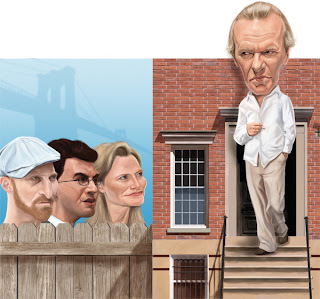
I have a confession to make: I've only been digital painting for a couple of years now, and for many more years before then I did all my illustration work in vector programs like Adobe Illustrator and Flash. So even though I love digital painting with Photoshop, I still find opportunities to speed up my workflow by returning to my old vectory ways. Such was the case when I was hired to do my second cover for The New York Observer. It's a real honor getting to work for the Observer, considering the amazing array of talented illustrators that have done covers for them, and Design Director Ivy Simones is awesome to work with. But being a weekly newspaper, the deadlines are extremely tight so in order to meet my deadline I have to use every trick I know in order to produce good work in the most efficient and timely manner possible. In this particular instance, by the time I received the okay to paint my original sketch, I had a little bit over one day to do the final illustration. I used to work a few years ago as an art director for a monthly magazine so I know how important it is for me as an illustrator to do everything in my power to make the AD's life easier on deadline day. The editors were pretty specific in their request for not only doing a caricature of author Martin Amis and three other New York scribblers, but also they wanted a typical NY brownstone apartment building, a fence and even the Brooklyn Bridge in the final image. Whenever I have complex objects like buildings to illustrate, I find it's easier for me to first build the underlying structure of the object in vectors, then paint over those shapes. I used Adobe Illustrator to build the foundation of my background objects, but Photoshop's pen and shape tools can be used pretty much the same way as Illustrator.

I started building the fence first. I used the pen tool to draw a simple shape for the one of the slats.

Next, I wanted to give the object a little dimension, so I selected Copy (Command + C, or Control + C on a PC), then Paste in Back (Command + B). With the background object still selected I used the arrow keys to nudge it over to the right a little bit until it looked like this:
There I had my first fence slat. I copied the object several times. In Illustrator you can do this quickly by selecting the object, then by holding down the Option and Shift keys while dragging the object to the right to create an exact duplicate of the fence. I did this several times, then added a long skinny rectangular cross-beam on top until the finished piece looked like this:

 I continued this process of creating simple shapes and setting them each up on individual layers until I ultimately had the barebones version of my background.
Then, piece by piece, I selected the individual elements from my vector background and pasted them into my Photoshop document as Smart Objects (you won't need to do this step if you build your pieces in Photoshop to begin with).
 I went back to work on my fence again. I used the Magic Wand tool in Photoshop to select the top and bottom section of my first fence slat like so:
 Then, because I knew time was short, I chose to add a real wood texture from a photograph. I dug up a cheap stock photo of some wood planks. Then used the Marquee Tool to select one of the planks. I selected Copy (Command + C), then returning to the selection I made in my vector object I chose the Paste Into command (Command + Shift + V). This actually auto-generates an editable mask around the texture and placing it on a new layer that fits perfectly.
And it looks like this:

I repeated this process for each of the wood slats until I had the entire fence built. After that, I went back in and reduced the transparency on each of my wood texture shapes. Then I used some custom brushes I've put together over the years, and painted over the wood textures so that they blended into the rest of the illustration. Lastly, I painted some shadows I on a Multiply layer. The complete fence looked like this:

I did much the same thing by pasting in some brick textures into the main structure of the brownstone. This saved me a ton of time I would have otherwise had to spend paintstakingly rendering each individual brick. If I'd had more time I probably would have done just that, but time was at a premium and even by taking these shortcuts, I still ended up finishing the illustration with literally minutes to spare before my deadline. Ivy was happy, which of course made me a happy boy as well.

Wednesday, April 27, 2011

New York Observer


My second New York Observer cover is on the newsstands today. Thanks again to Super Design Director Ivy Simones, who is all around awesome to work with. They were pretty specific this time around what they wanted. The cover article deals with the famous British author Martin Amis moving to Brooklyn. They interviewed several other New York authors and asked them what they thought of this move (hint: most of them don't like him). Behind the fence, from left to right are authors Jonathan Ames, Jonathan Safran Foer and Jennifer Egan. Here's a bigger version of the illustration.


Thursday, April 21, 2011

Natalie Portman


Here's a digital painting I did of Natalie Portman for the latest Caricaturama challenge over on FaceBook. The reference shot I used is from the movie "Closer", which I've never actually seen (although I probably should, considering she plays a stripper). I really loved the colors from the photo and thought it would be cool to try to capture them here.

Tuesday, April 19, 2011

Obama and Paul Ryan

Here's a self-promotional image I've been working on of President Obama and Representative Paul Ryan, who each released competing budget plans within the last couple weeks. I got the idea of depicting the two of them in a tussle after hearing the President invited Ryan to sit in the front row while he unveiled his own plan, simultaneously trashing Ryan's plan for destroying Medicare as we know it and giving big more tax breaks to the very wealthy at the expense of everyone else.

Sunday, April 10, 2011

David Hasselhoff

I took my little boy to see the movie Hop this weekend and it was completely horrible. It did contain an extended cameo from The Hoff, and as I watched him on the giant screen I started to formulate how I would do his caricature. Here's the result.

Saturday, April 02, 2011

Daniel Day Lewis

Here's a painting of Daniel Day Lewis I did for this week's Caricaturama challenge over on Facebook. The reference for this one comes from one of my favorite movies I've seen Lewis in, There Will Be Blood. I intentionally kept the brushstrokes blocky and I was certainly channeling my inner J.C. Leyendecker here.

Thursday, March 31, 2011

Michelle Bachman sketch

Quickie digital sketch of crazy-eyed Minnesota Congresswoman Michelle Bachman. About 20 minutes in Photoshop.

New York Observer cover


I was extremely honored to be able to a cover recently for The New York Observer. For years, The Observer has published covers by some of the finest illustrators in the world. It's like the Justice League of Illustration: Drew Friedman! Victor Juhasz! Philip Burke! Edel Rodriguez! Robert Grossman! Barry Blitt! Jason Seiler! Dale Stephanos! And the list goes on and on. I'm humbled to be in such company (although I think it makes me more the Gleek the purple monkey of this particular group of Superfriends). Design Director Ivy Simones was awesome to work with (as well as being one heckuva designer). The cover is of SEC Chairman Mary Schapiro. The article is highly critical of the job Ms. Schapiro's been doing, but the thing that struck me about the article was despite the growing criticism, everyone seems to still like her. That made me think there must be something about this Mary woman, which led me to doing this parody of the poster for the movie "There's Something About Mary".

Sunday, March 27, 2011

Sharon Stone Sketch

Digital sketch of Sharon Stone for a Caricaturama challenge over on FaceBook. Painted in Photoshop.

Thursday, March 24, 2011

Liz Sketch

Lunchtime sketch of Liz Taylor. Drawn in ballpoint pen.

Tuesday, March 22, 2011

Guy Fieri Sketch

Doing some sketching in Photoshop. This is celebrity chef and TV host Guy Fieri. About 90 minutes in Photoshop.

Monday, March 21, 2011

Prints for Sale


I just started a new venture with my new bud, the great British illustrator and comic book artist Des Taylor. Des has begun an artist's collective known as "The Lost 20" of which he asked me to join. You can purchase limited edition prints of my or any of the other great artists in the collective on the site. Check it out here:

http://despop.co.uk/?page_id=4&category=11

Friday, March 18, 2011

Reality Queens for Playboy


I was extremely honored to be able to do my first spot illustrations for Playboy. Senior Art Director Bruce Hansen was a pleasure to work with. The column by comedian Lisa Lampanelli deals with the trouble involved with dating today's reality TV stars. Here's Kate Gosselin, Kim Kardashian and everybody's darling Snooki.

Saturday, March 12, 2011

Elvis WIP

I know, the world needs another Elvis caricature like I need another hole in my head, but here's what I'm working on right now.

Wednesday, March 09, 2011

Paul Giamatti sketch

Here's a digital sketch of actor Paul Giamatti I did tonight. This is about 90 minutes in Photoshop.

Tuesday, March 08, 2011

Muammar Gadaffi

Here's a digital painting I did of Libyan dictator Muammar Gadaffi. This started as a simple sketch in Sketchbook Pro, then kept developing into a final piece.

Monday, March 07, 2011

Another caricature commission

Here's a new commission I did of a marketing professional and cool dude named Blain Skinner.

Thursday, March 03, 2011

Charlie Sheen sketch

Here's a rough sketch I painted today of the current Jerk-of-the-Moment Charlie Sheen. This about an hour and a half in Photoshop.

Sunday, February 27, 2011

Nick Cave(man)

Here's another painting I did for this week's Caricaturam 3000 contest over on FaceBook. The subject this week was singer Nick Cave. There are ton of fantastic entries over there, so I decided to do something a little different. I was pretty much raised on a steady diet of Mad Magazine, and Mort Drucker and Jack Davis are gods to me. I think this shows their influence.

Tuesday, February 22, 2011

Scott Walker sketch


I did a little sketching to unwind before I go to sleep. Here's a speed painting of Wisconsin Governor Scott Walker, who, as you probably know, is doing his darndest to take away the rights of state workers right now under the guise of fiscal responsibility. Yeah right. This was one hour in Photoshop.

Sunday, February 20, 2011

One more Bardot

I found so many great reference photos I couldn't resist trying one more. Here's a value painting I did of Brigitte Bardot in Photoshop. Now I'm tired. Markie need sleep.

Saturday, February 19, 2011

Bardot

Here's what I'm thinking will be my final submission for the Caricaturama contest. I'm tempted to tweak it a bit more here and there, but I've got other projects in the pipeline I have to get to.

Thursday, February 17, 2011

Brigitte Bardot - WIP

Here's a painting I'm working on for the Caricaturama Showdown 3000 competition over on FaceBook. It's a weekly competition open to caricature artists far and wide in which every week a new subject is named and the winner is voted on by the group, and he or she gets bragging rights and also names the next week's subject. This week is French sexpot Brigitte Bardot. Here's my work in progress. I've still got a way to go.

Monday, February 14, 2011

Cee Lo Green

Cee Lo Green's album "The Lady Killer"has been in heavy rotation on my IPhone lately. I spent a few hours tonight painting the man himself. He has a really unique shaped head that made for a fun caricature. I chose to do this in black and white in order to focus on the capturing the values. This was done in Photoshop over a ballpoint pen sketch.

Saturday, February 12, 2011

Private Commission

Here's a private commission I just did of Stefan Mumaw, the incredibly talented Creative Director of Reign, a Kansas City ad agency. Stefan has authored five books on design and the creative process (I highly recommend Caffeine for the Creative Mind). I'm incredibly gratified he chose me to paint his new profile portrait. Extra thanks to the mighty Von Glitschka, who steered Stefan my way via Twitter.

Tuesday, February 08, 2011

Emma Stone Sketch

I did a little digital sketching tonight. This time I used a pic of actress Emma Stone (Zombieland, Easy A). This is after about two hours of painting in Photoshop.

Saturday, January 22, 2011

Rupert Murdoch

I began painting the sketch I did a few days ago of media mogul Rupert Murdoch. All those wrinkles turned out to be a lot of fun to paint. I simplified my painting method a bit this time around, and I think the result came out pretty well. This was all done painting with two basic Photoshop brushes on a single layer.

Tuesday, January 18, 2011

A Couple of New Sketches

Here are a couple of recent sketches from the trusty 'ol sketchbook. The top one is media mogul Rupert Murdoch and below is Sherlock Holmes creator Sir Arthur Conan Doyle. Both are done in ballpoint pen on paper.

Monday, January 17, 2011

Vamp

Not a lot to say about this one. I was just sort of playing around. It started out as a straight portrait and over time it just sort of morphed into a vampire. This all Photoshop from start to finish.

Wednesday, December 29, 2010

Kristin Stewart Sketch

One thing I need to do all the time in order to keep up the artistic muscles is sketch. Either pencil on paper, or in this case, all done on my Mac in Sketchbook Pro and Photoshop. If I don't sketch constantly I grow rusty really fast and it makes it that much harder to get going when I have a client with a job. I keep a folder full of celebrity photos on my computer for whenever I have some down time between projects where I'll grab some reference pretty much at random and practice. This time it was "Twilight" actress Kristin Stewart (or "K-Stew" as the tabloids seem to be referring to her). She's got a great face for caricature because of her really prominent forehead and chin, which is what I chose to exaggerate here. This is after about two hours of work. I'm at that stage where I could turn it into a finished piece with a couple more hours of polishing and smoothing, but I think I'm going to leave it where it's at. It was just practice, after all, and I really like the roughness of it.

Wednesday, December 01, 2010

Bob Redux


 A couple things were bugging me about the likeness. I tweaked the nose and chin and I think it improves the likeness overall. 

Tuesday, November 30, 2010

Bob Dylan Sketch

I spent a couple hours tonight painting over a ballpoint pen sketch of a young Bob Dylan. Here's what I was able to accomplish.

Sunday, November 21, 2010

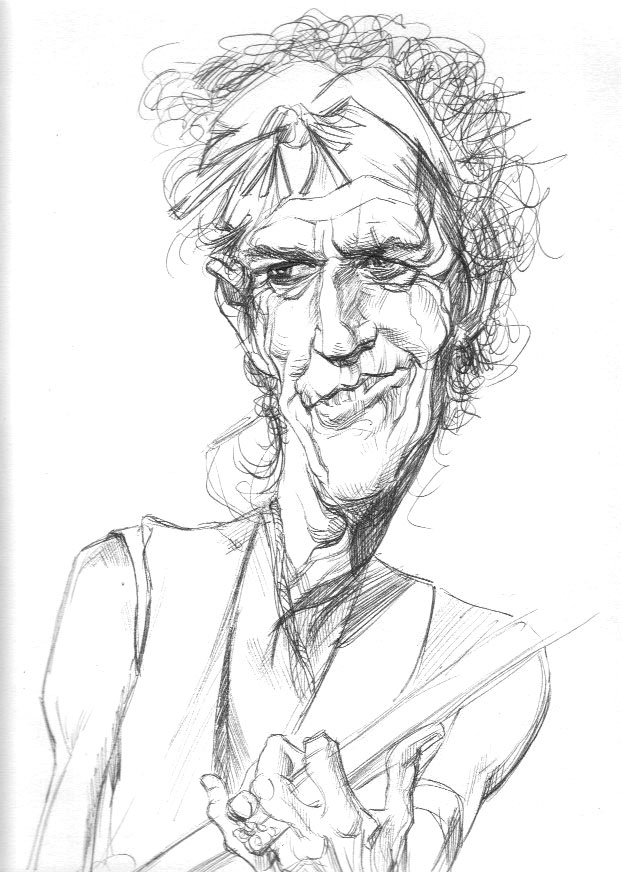
Keith Richards

I'm not sure anyone should attempt to paint Keith Richards other than Sebastian Kreuger, but I tried anyway.

Friday, November 12, 2010

Sketchbook Dump

I finished up a new sketchbook. Here are a few of the better things in it.


Thursday, November 11, 2010

Sherlock

I've been a big Sherlock Holmes fan ever since I was a kid. I've read all the original Sir Arthur Conan Doyle stories and many, many of the pastiches that have been written over the years. I've seen dozens and dozens of movies and TV shows, including all the Basil Rathbone and (my favorite) Jeremy Brett movies. So when I heard the BBC had aired a new version set in the modern day I was, to say the least, skeptical. It turns out, Sherlock is pretty brilliant. It's funny, exciting, smart, and just plain fun. Here's my take on the two stars: Martin Freeman (Tim from the British Office) as Watson and the remarkably named Benedict Cumberbatch as Holmes. BTW, if you haven't seen the show yet, I highly recommend it.

Friday, November 05, 2010

Painting Tutorial

For anyone who's interested, I wrote a digital painting tutorial to accompany the Clint Eastwood painting I posted below. It can be found over on the very excellent blog Illustration Pages. http://bit.ly/9Unl7Z

Tuesday, November 02, 2010

Clint

Finished this up tonight. I'm putting together a tutorial on how I painted this one. I'll post the how-to soon.

Monday, November 01, 2010

Clint Eastwood - WIP

Working on a Clint Eastwood painting for a tutorial I'm putting together.